Hadoop Notes
Hadoop Notes
Updated:
阅读中文版
Hadoop Distributed Framework

1. Hadoop Overview (For Understanding)
1.1 The History, Current State, and Future of Big Data
1.1.1 The History of Big Data
Big data did not emerge from nowhere; it has its own development process, which can be roughly divided into three stages.
- The first stage: The Budding Period (1990s to early 2000s).
-
In 1997, David Ellsworth and Michael Cox from the NASA Ames Research Center first used the term "big data" while researching data visualization.
-
In 1998, the journal Science published an article titled "Visualization of Big Data Science," marking the official appearance of "big data" as a technical term in a public journal.
-
In October 2003, Google published the Google File System paper, which solved the storage problem for massive web pages.
-
In October 2004, Google published the MapReduce paper, which solved the index computation problem for massive web pages.
-
After seeing these two papers, Doug Cutting was overjoyed. He quickly implemented the predecessors of HDFS and MapReduce based on the ideas in Google's papers, extracted them from Nutch, and established the independent open-source project Hadoop.

Doug Cutting, the Father of Hadoop
In summary, the budding period of big data was marked by the publication of Google's papers and the establishment of the Hadoop project. The former provided theoretical support, while the latter provided an open-source solution.
- The second stage: The Development Period (early 2000s to 2010).
-
After 2006, Hadoop developed rapidly and became the primary technology for data analysis. In the same year, Google published the Big Table paper, which ultimately inspired the creation of HBase.
-
In 2007, Baidu began using Hadoop for offline processing.
-
In 2008, Hadoop became a top-level project of the Apache Software Foundation. Yahoo sorted 1TB of data on 900 nodes in just 209 seconds, making it the fastest in the world. From then on, Hadoop rose like a star in the field of software development.
-
In 2010, the President's Council of Advisors on Science and Technology (PCAST) in the US released a report titled "Designing a Digital Future," detailing the collection and use of big data in government work.
-
Subsequently, many Hadoop ecosystem projects began to emerge, gradually forming the big data ecosystem. These included Sqoop, for importing and exporting data between relational databases and the Hadoop platform; Flume, for distributed collection, aggregation, and transmission of large-scale logs; and Oozie, a workflow scheduling engine for MapReduce jobs.
In summary, big data technology, represented by Hadoop, developed rapidly during this period, forming a relatively complete technical ecosystem.
- The third stage: The Flourishing Period (2011 to present).
- In 2011, MGI released the "Big Data: The Next Frontier for Innovation, Competition, and Productivity" report, detailing the applications of big data in various fields and its technical frameworks.
- In 2012, the World Economic Forum held in Switzerland discussed a series of issues related to big data, published a report titled "Big Data, Big Impact," and officially declared the arrival of the big data era.
- In March 2012, President Obama signed and launched the "Big Data Research and Development Initiative."
- In July 2012, the United Nations released a white paper titled "Big Data for Development: Challenges & Opportunities," pushing global big data research into an unprecedented peak period.
- In May 2013, the McKinsey Global Institute released a research report "Disruptive technologies: Advances that will transform life, business, and the global economy," which did not list big data technology. Their explanation was that big data technology had become the foundation for other technologies.
- In September 2015, the State Council of China issued the "Action Outline for Promoting the Development of Big Data."
- On March 17, 2016, the national "13th Five-Year Plan" outline was released, explicitly stating matters related to big data development.
In summary, after 2011, the development of big data entered a period of comprehensive prosperity. Big data permeated all walks of life, continuously transforming existing industry technologies and creating new ones, showing a vigorous trend.

1.1.2 The Current State of Big Data
Based on the varying depth of data development and application, numerous big data applications can be divided into three levels.
- The first level: Descriptive analytics applications.
This involves summarizing and extracting relevant information and knowledge from big data to help people analyze what happened and present the development process of things. For example, the US company DOMO extracts and integrates data from various information systems of its enterprise clients, then pushes the information contained in the data to business personnel and managers in different roles through visualizations like statistical charts, helping them better understand the company's current state and make judgments and decisions.
- The second level: Predictive analytics applications.
This involves analyzing the relationships and development patterns between things from big data and predicting future trends based on this analysis. For example, David Rothschild, a researcher at Microsoft Research New York, collected and analyzed large amounts of public data, such as betting markets, the Hollywood Stock Exchange, and posts from social media users, to build predictive models for forecasting the winners of multiple Academy Awards. In 2014 and 2015, he accurately predicted 21 out of 24 Oscar winners, an accuracy rate of 87.5%.
- The third level: Prescriptive analytics applications.
This involves analyzing the consequences of different decisions based on the first two levels, guiding and optimizing decisions. For example, self-driving cars analyze high-precision map data and massive real-time perception data from sensors like LiDAR and cameras to predict the outcomes of different driving behaviors and guide the vehicle's autonomous driving accordingly.
Below are some examples of big data applications in corresponding industries.
E-commerce Industry
When using e-commerce apps, customer information (including preferences, search history, wish lists, and shopping carts) is collected to predict which products customers are more likely to purchase. The algorithms consider the delivery address of registered customers, allowing selection of the nearest warehouse for delivery, reducing delivery time and associated costs.

- Better understand customers
- Keep up with market trends
- Set optimal prices
- Warehouse optimization
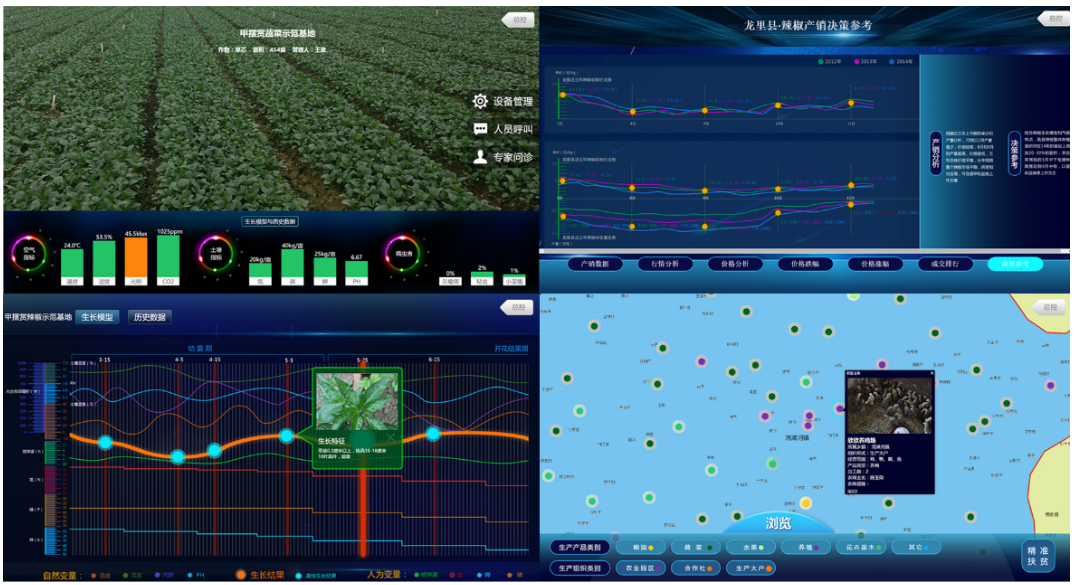
Agriculture
Finance Industry
Tourism Industry
Healthcare Industry
Transportation Industry
......
1.1.3 The Future of Big Data
The development of big data is very rapid, and future trends include the following characteristics:
-
Integration with Intelligent Computing.
This includes combining big data with neural computing, deep learning, semantic computing, and other related AI technologies. Thanks to the rapid development of computing technologies represented by cloud computing and big data, information processing speed and quality have greatly improved, enabling fast, parallel processing of massive data.
-
Interdisciplinary and Cross-Domain.
Due to the poor usability of existing big data platforms, and the fact that data in vertical application industries involves domain expert knowledge and domain modeling, there is currently a significant gap between big data applications in specific industries and general big data technology, lacking cross-fertilization. Therefore, there is an urgent need for interdisciplinary and cross-domain big data technology and application research to promote and drive the application and implementation of big data in typical and major industries, especially its integration with hot technology fields like the Internet of Things, mobile internet, cloud computing, and social computing.
-
Involving Security and Privacy.
In the era of big data, websites open their real-time user-generated data to varying degrees. Some market analysis agencies monitoring data can analyze and mine combinations of data, such as information people write on social networking sites and location data from smartphones. However, in the big data era, data cannot guarantee that personal information won't be illegally used by other organizations. Solving user privacy and security issues is urgent. Security intelligence emphasizes integrating and correlating previously scattered security information, combining independent analysis methods and tools for interaction, ultimately achieving intelligent security analysis and decision-making.
-
Combining with Visualization Technology.
Before analysis, exploratory examination of the data is needed. Visualization plays a significant role in this process. After analyzing big data, the results also need to be displayed for user comprehension. Especially, visual mobile data analysis tools can track user behavior, allowing app developers to evaluate their products from the user's perspective. By observing how users interact with an app, developers can understand why users perform certain actions, providing a basis for improving and refining their products.
1.2 The Concept, Characteristics, and Value of Big Data
1.2.1 The Concept of Big Data
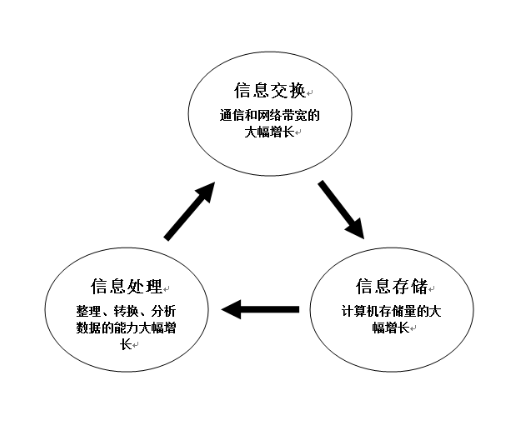
Regarding the concept of big data, referring to Martin Hilbert's summary, what we commonly call big data today actually refers to data generated after 2000 due to the significant increase in capabilities in three areas: information exchange, information storage, and information processing, as shown in the figure below.
 mapreduce
hdfs
1.2.2 The Characteristics of Big Data (5V)
-
Volume
The volume of data collection, storage, and computation in big data is very large. So how big is big data? A normal computer takes 4 minutes to process 4GB of data, 3 hours to process 1TB, and 4 months and 3 days to process 1PB of data.
Computer storage units are generally represented by bit, Byte, KB, MB, GB, TB, PB, EB, ZB, BB. We often abbreviate Byte as B and KB as K. Like "a few K" or "a few B".
Conversion relationships:
1B (Byte) = 8bit, e.g., IP 192.168.32.1 = 11111111 11111111 11111111 00000000 1KB (Kilobyte) = 1024B, 1MB (Megabyte) = 1024KB, 1GB (Gigabyte) = 1024MB, 1TB (Trillionbyte) = 1024GB, where 1024 = 2^10 (2 to the power of 10), 1PB (Petabyte) = 1024TB, 1EB (Exabyte) = 1024PB, 1ZB (Zettabyte) = 1024 EB, 1YB (Yottabyte) = 1024 ZB, 1BB (Brontobyte) = 1024 YB.

-
Velocity
-
Variety (Structured data (data in databases), semi-structured logs, web crawlers, unstructured data)
-
Value (Low value density)
-
Veracity
1.2.3 The Value of Big Data
From a business perspective, the core value of big data mainly includes the following three points:
-
Data-Assisted Decision Making.
Providing enterprises with basic data statistical reporting and analysis services. Analysts can easily access data to produce analysis reports guiding product development and operations. Product managers can improve product features and user experience through statistical data. Operations personnel can identify operational issues and determine strategies and directions through data. Management can understand the company's business operations through data to make strategic decisions.
-
Data-Driven Business.
Achieving intelligence in enterprise products and operations through data products and data mining models, greatly improving overall enterprise efficiency and output. The most common application areas include precision marketing services based on personalized recommendation technology, advertising services, and risk control, anti-fraud, and credit services based on model algorithms.
-
Data Monetization.
Generating cash income by carefully packaging data and providing external data services. Common examples in the market include major data companies leveraging their big data to provide risk control queries, verification, anti-fraud services, customer acquisition, traffic generation, precision marketing services, and open data platform services.
In practice, however, more people prefer to divide the value of data into two aspects: one is creating revenue for the enterprise, and the other is saving costs for the enterprise.
1.3 Big Data Technology

Big data technology is a collective term for a series of technologies. It encompasses data collection and transmission, data storage, data processing and analysis, data mining, data visualization, and other technologies, forming a vast and complex technical system.
- Data Source Layer (For Understanding)
The data source layer mainly refers to the diverse raw data across various big data industries, such as internet user data, web server system log data, and enterprise database data.
- Data Collection Layer (For Understanding) - ETL Engineer
The big data collection layer primarily uses big data collection technologies to perform ETL operations on data. ETL is an abbreviation for Extract-Transform-Load, where data is extracted from the source, transformed, and loaded to the destination. Users extract the required data from the data source, perform data cleaning, and finally load the data into the data warehouse according to a pre-defined data model, followed by data analysis and processing on the data in the warehouse. Data collection is a crucial part of the data analysis lifecycle, obtaining various types of structured, semi-structured, and unstructured massive data through methods like sensor data, social network data, and mobile internet data.
- Data Storage Layer (For Understanding)
After collecting large amounts of data, we need to store the big data. Data storage is divided into persistent storage and non-persistent storage. Persistent storage means storing data on disk; data is not lost after shutdown or power failure. Non-persistent storage means storing data in memory; read/write speeds are fast, but data is lost after shutdown or power failure.
- Data Processing Layer (For Understanding)
Once we have collected the data and ensured storage and read/write are working correctly, what do we do with this pile of data? Besides preserving raw data and making backups, we need to consider leveraging it to generate greater value. First, we need to process this data. Big data processing is divided into two types: batch processing (offline processing) and real-time processing (online processing).
- Data Modeling Layer (For Understanding)
Data collection, storage, and processing are the foundational setup of a big data architecture. Generally, completing these three layers transforms data into foundational data, supporting upper-level business applications. R and Python can be used for data analysis, or Mahout and Spark ML can be used to perform integrated modeling based on algorithm models and business models, mining valuable information to better provide high-quality results for business applications.
- Data Application Layer (For Understanding)
The data application layer is the goal of applying big data technology. It typically provides functions like querying, reporting, and data visualization. Open-source projects like Lucene, Solr, Elasticsearch, ECharts, and CK make information query and data visualization implementation possible.
1.4 Offline Computing and Real-Time Computing in Big Data

1.4.1 Big Data Offline Computing
Big data offline computing utilizes the big data technology stack (mainly Hadoop). All input data must be prepared before computation starts, this input data does not change, and the computation result must be obtained immediately after solving a problem. Offline computing can also be understood as batch computing, as opposed to online computing or real-time computing.
Characteristics of Big Data Offline Computing:
- Massive data volume, long retention time.
- Complex batch operations on large amounts of data.
- Data is fully in place before computation and does not change.
- Computation results can be queried conveniently.
1.4.2 Big Data Real-Time Computing
Big data real-time computing refers to data being generated in real-time and processed immediately upon generation. This computing approach tends to treat data as a stream.
Characteristics of Big Data Real-Time Computing:
- Continuous data input, continuous computation.
- Low latency, response time required at the second level.
- Computation results are generally stored in in-memory databases (e.g., Redis).
- Query results are typically real-time summary data up to a certain point in time.
Differences between Real-Time and Offline Computing:
| Offline Computing | Real-Time Computing | |
|---|---|---|
| Storage | HDFS | Message Queues, e.g., Kafka |
| Framework | MapReduce|Hive | Spark (DStream)|Storm |Flink |
| Speed | Slow, High Latency | Fast, Low Latency |
| Feature | Batch Computing | Real-Time Computing: 7×24 |
2. Components of Hadoop
Hadoop is a distributed system developed by the Apache Software Foundation. Users can develop distributed programs without understanding the underlying details of distributed systems.
In a broad sense, Hadoop has a wider concept -----> Hadoop Ecosystem -> Distributed: multiple servers doing the same thing.

Hadoop Ecosystem
In a narrow sense, Hadoop consists of the Hadoop Distributed File System (HDFS), the distributed computing framework (MapReduce), and the resource scheduler (YARN), primarily used to solve the storage and computation of massive data.
2.1 HDFS Overview
HDFS stands for Hadoop Distributed File System. It originates from Google's GFS paper published in October 2003. HDFS is a clone of GFS and serves as the foundation for data storage management in the Hadoop ecosystem. It is a distributed file system designed for commodity hardware, providing highly reliable, highly scalable, and high-throughput data storage services.
2.1.1 NameNode (NN)
Stores metadata for files, such as file names, file attributes (creation time, replication factor, file permissions), directory structure, and the DataNodes corresponding to each file block.

2.1.2 DataNode (DN)
NameNode issues commands, DataNode executes operations and stores the actual data.

2.1.3 Secondary NameNode (2NN)
Periodically backs up the NameNode's metadata.
2.2 MapReduce Overview
Originating from Google's MapReduce paper published in December 2004, it is a simplified programming model for developing distributed applications. It allows developers to easily write distributed parallel programs without understanding the underlying details of distributed systems or having experience in parallel application development.
2.3 YARN Overview
YARN is a pure resource management and scheduling framework. Its purpose is to provide unified resource management and scheduling for upper-layer applications. Its introduction brings significant benefits to the cluster in terms of utilization, unified resource management, and data sharing.
ResourceManager
NodeManager
3. Hadoop Cluster Installation
3.1 Hadoop Download
Official Website: http://hadoop.apache.org/releases.html
Download Link: https://archive.apache.org/dist/hadoop/common/
3.2 Template Machine Preparation
Use the machine from our class as the template machine. It is recommended to have 4GB RAM and a 40GB hard drive. Create the /opt/software directory to store installation packages.
[root@bigdata04 ~]# mkdir /opt/software3.3 Cloning Virtual Machines
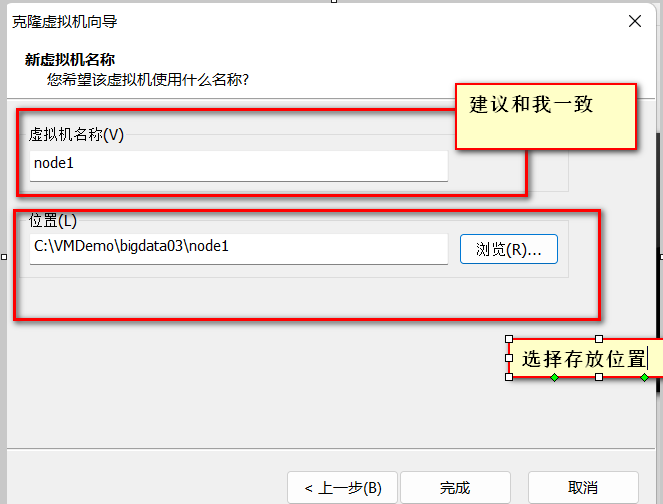
3.3.1 Clone three virtual machines from the template machine: node1, node2, node3.
- Shut down the running virtual machine, right-click --> Manage --> Clone.

- Choose "Create a full clone".

- Modify the IP addresses of node1, node2, node3 to be on the same network segment.

[root@bigdata04 ~]# vi /etc/sysconfig/network-scripts/ifcfg-ens33#Add IP address, must be on the same network segment as your own. The instructor uses the 192.168.139 segment.
IPADDR=192.168.139.10
#Add gateway
GATEWAY=192.168.139.2
#Add domain name resolver
DNS1=192.168.139.2
#Change BOOTPROTO="dhcp" to static
BOOTPROTO="static"
#Change ONBOOT="yes"
ONBOOT="yes" #Whether the network interface is activated at system startup (yes/no)- Modify the hostname and mapping file.
[root@bigdata04 ~]# vi /etc/hostname
node1
[root@bigdata04 ~]# vi /etc/hosts
192.168.32.11 node1
192.168.32.12 node2
192.168.32.13 node3
[root@bigdata04 ~]# rebootModify the Windows mapping file (hosts file).
File location: C:\Windows\System32\drivers\etc\hosts
Copy the file to the desktop for modification, add the following content:
192.168.32.11 node1
192.168.32.12 node2
192.168.32.13 node3Overwrite the hosts file at C:\Windows\System32\drivers\etc with the desktop hosts file.
3.4 Installing JDK
- Download JDK
Download link: https://www.oracle.com/java/technologies/downloads/
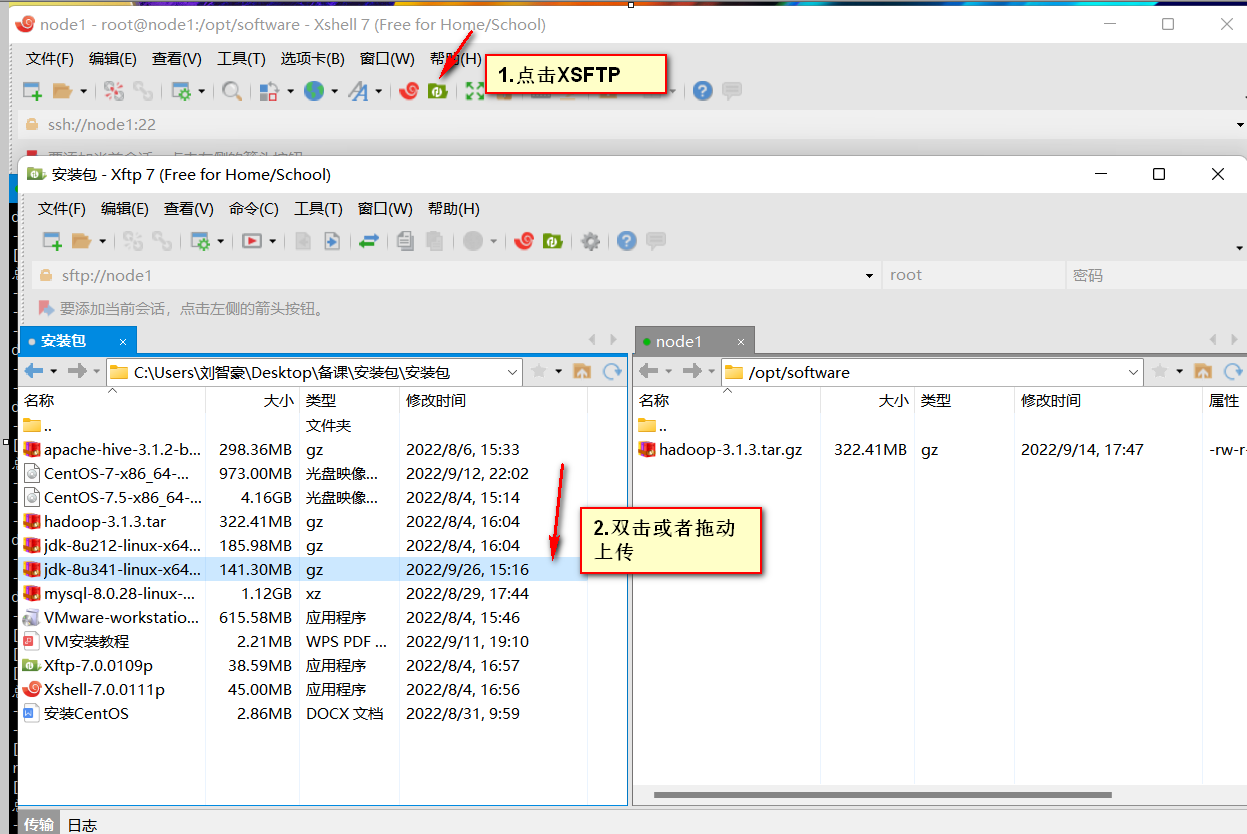
- Upload JDK to /opt/software
- Navigate to the upload directory and extract.
[root@node1 software]# tar -zxvf jdk-8u341-linux-x64.tar.gz -C /opt/- Configure environment variables.
[root@node1 ~]# cd /etc/profile.d/
[root@node1 profile.d]# touch bigdata_env.sh
[root@node1 profile.d]# vim bigdata_env.sh
Add environment variables:
#JAVA_HOME
export JAVA_HOME=/opt/jdk1.8.0_341
export PATH=$PATH:$JAVA_HOME/bin- Test if the installation was successful.
[root@node1 ~]# java -version
java version "1.8.0_341"
3.5 Installing Hadoop
- Download Hadoop
Download link: https://archive.apache.org/dist/hadoop/common/
- Upload Hadoop to /opt/software
Same steps as uploading JDK in 3.4.
- Extract Hadoop.
[root@node1 software]# tar -zxvf hadoop-3.1.3.tar.gz -C /opt/- Configure environment variables.
[root@node1 software]# vim /etc/profile.d/bigdata_env.shAdd environment variables:
#HADOOP_HOME
export HADOOP_HOME=/opt/hadoop-3.1.3
export PATH=$PATH:$HADOOP_HOME/bin
export PATH=$PATH:$HADOOP_HOME/sbin- Verify if the installation was successful.
[root@node1 ~]# hadoop version
Hadoop 3.1.3- Hadoop directory structure.
[root@node1 hadoop-3.1.3]# ll
total 176
drwxr-xr-x. 2 root root    183 Sep 12 2019 bin
drwxr-xr-x. 3 root root     20 Sep 12 2019 etc
drwxr-xr-x. 2 root root    106 Sep 12 2019 include
drwxr-xr-x. 3 root root     20 Sep 12 2019 lib
drwxr-xr-x. 4 root root    288 Sep 12 2019 libexec
-rw-rw-r--. 1 root root 147145 Sep  4 2019 LICENSE.txt
-rw-rw-r--. 1 root root  21867 Sep  4 2019 NOTICE.txt
-rw-rw-r--. 1 root root   1366 Sep  4 2019 README.txt
drwxr-xr-x. 3 root root   4096 Sep 12 2019 sbin
drwxr-xr-x. 4 root root     31 Sep 12 2019 share
- bin directory: Contains scripts for operating Hadoop-related services (HDFS, YARN).
- etc directory: Hadoop's configuration file directory, storing Hadoop configuration files.
- lib directory: Contains Hadoop's native libraries (for data compression and decompression).
- sbin directory: Contains scripts to start or stop Hadoop-related services.
- share directory: Contains Hadoop's dependency JARs, documentation, and official examples.
- Hadoop common ports.
(3) Common port descriptions
| Name | Hadoop2 | Hadoop3 |
|---|---|---|
| Hadoop HDFS NameNode | 8020 / 9000 | 9820 |
| Hadoop HDFS NameNode HTTP UI | 50070 | 9870 |
| Secondary NameNode | 50091 | 9869 |
| Secondary NameNode HTTP UI | 50090 | 9868 |
| Hadoop HDFS DataNode IPC | 50020 | 9867 |
| Hadoop HDFS DataNode | 50010 | 9866 |
| Hadoop HDFS DataNode HTTP UI | 50075 | 9864 |
3.6 Hadoop Operating Modes
Hadoop has three operating modes: Local (Standalone) Mode, Pseudo-Distributed Mode, and Fully Distributed Mode (used by companies).
3.6.1 Local Mode
This mode runs on a single machine without a distributed file system, directly reading and writing the local operating system's file system.
- Create an
inputfolder under Hadoop to store input files.
[root@node1 hadoop-3.1.3]# mkdir input
[root@node1 hadoop-3.1.3]# cd input- Create a test file, test.txt.
[root@node1 input]# vim test.txt
hello world
hello hadoop
hello hive
Save and exit with :wq.
- Run the official example program.
[root@node1 hadoop-3.1.3]# hadoop jar share/hadoop/mapreduce/hadoop-mapreduce-examples-3.1.3.jar wordcount input output- View the execution results.
[root@node1 output]# ll
total 4
-rw-r--r--. 1 root root 32 Sep 26 15:31 part-r-00000
-rw-r--r--. 1 root root  0 Sep 26 15:31 _SUCCESS
[root@node1 output]# cat part-r-00000
hadoop	1
hello	3
hive	1
world	1
3.6.2 Pseudo-Distributed Mode
This mode also runs on a single machine but uses different Java processes to simulate the various nodes in a distributed environment: (NameNode, DataNode, SecondaryNameNode).
- Passwordless SSH Login Configuration
Generate public and private keys.
[root@node1 ~] ssh-keygen -t rsaPress Enter three times to complete key generation.
Send the public key to the servers requiring passwordless login.
[root@node1 ~] ssh-copy-id node1- Modify configuration files.
core-site.xml: Core configuration items, including common I/O settings for HDFS, MapReduce, and YARN.
[root@node1 hadoop]# vim /opt/hadoop-3.1.3/etc/hadoop/core-site.xml<configuration>
<!-- Specify the address of NameNode -->
<property>
<name>fs.defaultFS</name>
<value>hdfs://localhost:9000</value>
</property>
<!-- Specify the storage directory for hadoop data -->
<property>
<name>hadoop.tmp.dir</name>
<value>/opt/hadoop-3.1.3/data</value>
</property>
<!-- Specify the hadoop user -->
<property>
<name>hadoop.http.staticuser.user</name>
<value>root</value>
</property>
</configuration>hdfs-site.xml: Configuration items for HDFS-related processes, including NameNode, SecondaryNameNode, DataNode, etc.
[root@node1 hadoop]# vim /opt/hadoop-3.1.3/etc/hadoop/hdfs-site.xml<configuration>
<property>
<name>dfs.replication</name>
<value>1</value>
</property>
</configuration>yarn-site.xml: Configuration items for YARN-related processes, including ResourceManager, NodeManager, etc.
[root@node1 hadoop]# vim /opt/hadoop-3.1.3/etc/hadoop/yarn-site.xml<configuration>
<!-- Specify MR to use shuffle -->
<property>
<name>yarn.nodemanager.aux-services</name>
<value>mapreduce_shuffle</value>
</property>
<!-- Specify the address of ResourceManager-->
<property>
<name>yarn.resourcemanager.hostname</name>
<value>node1</value>
</property>
</configuration>Add the following to /opt/hadoop-3.1.3/sbin/start-dfs.sh and /opt/hadoop-3.1.3/sbin/stop-dfs.sh:
HDFS_DATANODE_USER=root
HADOOP_SECURE_DN_USER=hdfs
HDFS_NAMENODE_USER=root
HDFS_SECONDARYNAMENODE_USER=root
Add the following to /opt/hadoop-3.1.3/sbin/start-yarn.sh and /opt/hadoop-3.1.3/sbin/stop-yarn.sh:
YARN_RESOURCEMANAGER_USER=root
HADOOP_SECURE_DN_USER=yarn
YARN_NODEMANAGER_USER=root- Cluster Startup
(1) If the cluster is starting for the first time, format the NameNode on node1 (Note: formatting the NameNode generates a new cluster ID, causing inconsistency between the NameNode and DataNode cluster IDs, and the cluster cannot find previous data. If errors occur during cluster operation and the NameNode needs reformatting, you must first stop the namenode and datanode processes, delete the data and logs directories on all machines, and then format.)
[root@node1 hadoop]# hdfs namenode -format(2) Start HDFS.
[root@node1 hadoop]# start-dfs.sh(3) Start YARN on the node where ResourceManager is configured.
[root@node1 hadoop]# start-yarn.sh(4) View HDFS NameNode on the web.
Enter in browser: http://node1:9870
(5) View YARN ResourceManager on the web.
Enter in browser: http://node1:8088
3.6.3 Fully Distributed Mode
This mode runs on multiple machines, representing true distribution, and is what companies use.
-
Complete the network configuration for the three virtual machines node1, node2, node3 (you can use more if performance allows).
-
rsync remote synchronization tool
Needs to be installed on all three servers.
yum -y install rsync
rsync is mainly used for backup and mirroring. It has the advantages of high speed, avoiding copying identical content, and supporting symbolic links.
(1) Basic syntax
rsync -av $pdir/$fname $user@ip:$pdir/$fname
Command Options File path/name to copy Destination user@host:destination path/name
Option descriptions
| Option | Function |
|---|---|
| -a | Archive copy |
| -v | Show copy process |
(2) Practice cases
Case 1: Sync /opt/software from node1 to /opt/software on node2. Choose yes, enter node2's password.
[root@node1 ~]# rsync -av /opt/software/ root@node2:/opt/software/(3) Write a remote synchronization script.
[root@node1 ~]# vim rsyncAll.sh #!/bin/bash
#Check the number of arguments
if [ $# -lt 1 ]
then
echo "Please enter arguments"
exit;
fi
# Iterate over all machines in the cluster
for host in node1 node2 node3
do
echo --------------- $host ---------------
# Iterate over all directories, send them one by one
for file in $@
do
#Check if the file exists
if [ -e $file ]
then
#Get the parent directory
pdir=$(cd -P $(dirname $file); pwd)
#Get the current file name
fname=$(basename $file)
ssh $host "mkdir -p $pdir"
rsync -av $pdir/$fname $host:$pdir
else
echo $file does not exist!
fi
done
done(4) Modify permissions and copy to /bin/.
[root@node1 ~]# chmod +x rsynsAll.sh
[root@node1 ~]# cp rsyncAll.sh /bin/
(5) Sync the JDK and Hadoop under /opt to node2 and node3.
- SSH Passwordless Login Configuration
(1) Basic syntax
ssh
[root@node1 ~]ssh node1(2) Principle
(3) Generate public and private keys.
[root@node1 ~] ssh-keygen -t rsaPress Enter three times to complete key generation.
(4) Send the public key to the servers requiring passwordless login.
[root@node1 ~] ssh-copy-id node1
[root@node1 ~] ssh-copy-id node2
[root@node1 ~] ssh-copy-id node3
Note: This step needs to be completed on node1, node2, and node3.
- Cluster Planning
| node1 | node2 | node3 | |
|---|---|---|---|
| HDFS | NameNode、DataNode | DataNode | SecondaryNameNode、DataNode |
| YARN | NodeManager | ResourceManager、NodeManager | NodeManager |
- Modify configuration files.
core-site.xml core file
<?xml version="1.0" encoding="UTF-8"?>
<?xml-stylesheet type="text/xsl" href="configuration.xsl"?>

<configuration>
<!-- Specify the address of NameNode -->
    <property>
        <name>fs.defaultFS</name>
        <value>hdfs://node1:9820</value>
</property>
<!-- Specify the storage directory for hadoop data -->
    <property>
        <name>hadoop.tmp.dir</name>
        <value>/opt/hadoop-3.1.3/data</value>
</property>
<!-- Specify the user for hadoop data -->
 <property>
        <name>hadoop.http.staticuser.user</name>
        <value>root</value>
</property>

</configuration>
vim hdfs-site.xml
<?xml version="1.0" encoding="UTF-8"?>
<?xml-stylesheet type="text/xsl" href="configuration.xsl"?>

<configuration>
	<!-- nn web access address-->
	<property>
        <name>dfs.namenode.http-address</name>
        <value>node1:9870</value>
    </property>
<!-- 2Related posts
By shared tagsHow to Write an MR Program
How to write a simple MapReduce program.
Common Big Data Commands
Some common commands for big data
Yarn Working Mechanism and Scheduling
Some insights into Yarn's working mechanism and scheduling.
Hazards of Small Files and How to Handle Them
Some insights on handling small files
Comments(0)