Hive
Hive Notes
Updated:
阅读中文版
Hive Data Warehouse

Chapter 1 Hive Architecture (Understanding)
1.1 Hive Overview
Hive was open-sourced by Facebook, primarily to solve the offline analysis of massive structured log data. Hive is an open-source data warehouse tool built on Hadoop, providing a series of tools for data extraction, transformation, and loading. It is a mechanism for implementing large-scale data storage, querying, and analysis on Hadoop. Hive can map structured data files to a table and provides a SQL-like query language called HiveQL (Hive Query Language). The essence of Hive is to convert HiveQL statements into MapReduce programs and submit them to the Hadoop cluster for execution. Hive allows developers unfamiliar with MapReduce to directly write SQL statements to perform statistical analysis on large-scale data, significantly lowering the learning curve and improving development efficiency. In short, the data processed by Hive is stored on HDFS, the underlying implementation for Hive data analysis is MapReduce, and the execution programs run on YARN.
Compared to traditional relational databases, from the perspective of internal implementation principles and the HiveQL language execution mechanism, Hive has the following characteristics:
1. Query language is close to SQL.
Since SQL is widely used in data warehouses, a SQL-like query language, HiveQL, has been specifically designed for Hive's characteristics. Developers familiar with SQL can easily use Hive for development. The interpretation, optimization, and generation of query plans for HiveQL statements are completed by the Hive engine.
2. Parallel execution.
Most query executions in Hive are implemented through MapReduce provided by Hadoop. Query plans are converted into MapReduce tasks and executed in parallel on the Hadoop cluster.
3. Uses HDFS for storage.
Hive is built on top of Hadoop, and all Hive data is stored in HDFS. Other databases store data in block devices or local file systems.
4. Supports custom data formats.
Hive does not define specific data formats; data formats can be specified by the user. Users defining a data format need to specify three attributes: column delimiter (usually space, "\t", "\x001"), row delimiter ("\n"), and the method for reading file data (Hive's default file formats include TextFile, SequenceFile, RCFile, etc.). Since there is no need to convert from user data formats to Hive-defined data formats during the data loading process, Hive does not modify the data itself during loading but only copies or moves the data content to the corresponding HDFS directory. Its data loading efficiency is higher than that of traditional databases.
5. Does not support data updates.
Since Hive is designed for data warehouse applications, and data warehouse content is read-heavy and write-light, Hive does not support rewriting or adding data. All data is determined at load time. This differs from traditional databases that support insert, update, and delete operations.
6. Does not support indexes.
As mentioned earlier, Hive does not process data during the loading process, nor does it even scan the data, so it does not build indexes for certain Keys in the data. When Hive needs to access specific values meeting certain conditions, it must perform a brute-force scan of the entire data, resulting in high access latency. Due to the introduction of MapReduce, Hive can access data in parallel, so even without indexes, Hive can still demonstrate advantages for large data volumes. In traditional databases, indexes are typically built on one or several columns, so for accessing small amounts of data with specific conditions, databases can achieve high efficiency and low latency. The high data access latency determines that Hive is not suitable for online data querying.
7. High execution latency.
When Hive queries data, it needs to scan the entire table due to the lack of indexes, resulting in high latency. Another factor contributing to Hive's high execution latency is the MapReduce framework. Since MapReduce itself has high latency, using MapReduce to execute Hive queries also results in high latency. In comparison, database execution latency is lower. Of course, this low latency is conditional—it applies when the data scale is small. When the data scale exceeds the database's processing capacity, Hive's parallel computing advantages become apparent.
8. High scalability.
Since Hive is built on Hadoop, Hive's scalability is consistent with Hadoop's scalability. Databases, due to the strict limitations of ACID semantics, have very limited scalability. Currently, the most mainstream database, Oracle, has a theoretical cluster expansion capacity of only about 100 nodes.
9. Large data scale.
Since Hive is built on a cluster and can leverage MapReduce for parallel computing, it can support very large data scales. Correspondingly, databases can support smaller data scales.
1.2 Hive Architecture
Hive provides users with a series of interactive interfaces. After receiving user-submitted Hive scripts, it uses its own Driver, combined with the MetaStore, to translate these scripts into MapReduce jobs, submit them to the Hadoop cluster for execution, and finally output the execution results to the user interaction interface. The Hive architecture is shown in the following figure.

As can be seen from the figure above, the Hive architecture mainly includes the following components: Cli, JDBC/ODBC, Web UI, Thrift Server, MetaStore, and Driver. These components can be divided into two categories: client-side components and server-side components. Additionally, Hive requires Hadoop support, using HDFS for storage and MapReduce for computation.
- Client-side components
As a data warehouse, Hive fully leverages Hadoop's distributed storage and computing capabilities, providing users with rich programming and command interfaces to support data query, aggregation, and analysis functions.
-
Cli.
Cli (Command line interface) is Hive's command-line interface and is the most commonly used user interface. When Cli starts, it also starts a Hive copy. Cli is the simplest and most common way to interact with Hive; you only need to type
hivein a Shell terminal with a complete Hive environment to start the service. Users can enter HiveQL in Cli to perform operations such as creating tables, changing properties, and querying. -
JDBC/ODBC.
JDBC is the Java Database Connection specification, which defines a series of Java access interfaces for various databases. Therefore, Hive-JDBC essentially plays the role of protocol conversion, converting JDBC standard protocols into protocols for accessing the Hive Server service. Hive-JDBC does not undertake other work besides network protocol conversion, such as SQL validity checking and parsing. ODBC is a set of standard APIs for database access, with its underlying implementation source code written in C/C++. Both JDBC/ODBC communicate with Hive Server through Hive Client, using the Thrift RPC protocol for interaction.
-
Web UI.
Web UI is Hive's web access interface, allowing users to access Hive services through a browser.
- Server-side components
-
Thrift Server.
Thrift is a software framework developed by Facebook for scalable and cross-language service development. Hive integrates the Thrift Server service, allowing different programming languages such as Java, Python, etc., to call Hive interfaces.
-
MetaStore Service.
The MetaStore service component is used to manage Hive's metadata, including: table names, the database to which a table belongs (default is
default), table owners, column/partition fields, table types (whether it's an external table), and the directory where table data is located. Hive metadata is stored by default in the built-in Derby database, but it is generally recommended to use MySQL to store the MetaStore. Metadata is very important for Hive, so Hive supports separating the MetaStore service and installing it on a remote server cluster, thereby decoupling the Hive service and MetaStore service to ensure the robustness of Hive operations. -
Driver.
The Driver component's role is to parse, compile, and optimize user-written HiveQL statements, generate execution plans, and then call the underlying MapReduce computing framework. The Hive Driver consists of four parts:
- Interpreter: Converts SQL strings into an Abstract Syntax Tree (AST). This step is usually completed using third-party tool libraries, such as antlr (Another Tool for Language Recognition—an open-source syntax analyzer that can automatically generate syntax trees based on input and display them visually); performs syntax analysis on the AST, such as checking whether tables exist, whether fields exist, and whether SQL semantics are correct.
- Compiler: Compiles the AST to generate a logical execution plan.
- Optimizer: Optimizes the logical execution plan.
- Executor: Converts the logical execution plan into a runnable physical plan. For Hive, this is MapReduce.
It should be noted here the connection and difference between Hive Server and Hive Server2. Both Hive Server and Hive Server2 are based on Thrift, and both allow remote clients to use multiple programming languages to operate on data in Hive. However, officially, Hive Server is no longer supported starting from Hive 0.15. Why is Hive Server no longer supported? This is because Hive Server cannot handle concurrent requests from more than one client. The reason is a limitation caused by Hive Server using the Thrift interface, which cannot be fixed by modifying the HiveServer code. Therefore, in Hive 0.11.0, the Hive Server code was rewritten to create Hive Server2, which solved this problem. Hive Server2 supports multi-client concurrency and authentication, providing better support for open API clients such as JDBC and ODBC.
Chapter 2 Hive Installation and Deployment
2.1 Installation Modes (Understanding)
Depending on the storage location of the metadata MetaStore, there are 3 Hive installation modes:
-
Embedded Mode (Embedded MetaStore).
Embedded mode is the simplest deployment method for Hive MetaStore. The Hive service and MetaStore service are in the same JVM, using Hive's embedded Derby database to store metadata. However, this mode can only accept one Hive session, meaning it can only provide services to one client. Hive officially does not recommend using embedded mode; this mode is typically used in developer debugging environments and is rarely used in real production environments. The Hive embedded mode is shown in the following figure.

-
Local Mode (Local MetaStore).
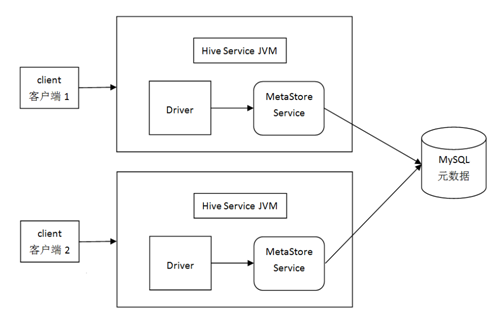
In this mode, the Hive service and MetaStore service are still in the same JVM. One Hive session will start one such JVM to provide services. The difference is that local mode does not use Derby but uses an independent database like MySQL to store the MetaStore. Common JDBC-compatible databases can serve as the storage medium for metadata. MySQL can be deployed locally or on a separate physical machine. The Hive local mode is shown in the following figure.
-
Remote Mode (Remote MetaStore).
Remote mode separates the "MetaStore service" into an independent service, rather than running in the same JVM as the Hive service. Multiple MetaStore services can be deployed to improve data warehouse availability. The Hive remote mode is shown in the following figure.
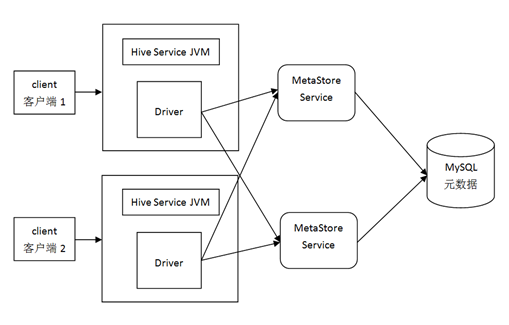
Overall, from embedded mode to remote mode, there is a gradual separation. Local mode separates the data, while remote mode separates the two services.
Metadata: Also known as intermediary data or relay data, it is data that describes data. It mainly describes the attributes of data and is used to support functions such as storage location, historical data, resource lookup, and file records.
- Hive Metadata is Hive's metadata.
- Includes meta-information such as databases, tables created with Hive, table locations, types, attributes, field order and types, etc.
- Metadata is stored in relational databases, such as Hive's built-in Derby or third-party databases like MySQL.
- Metastore is the metadata service. The role of the Metastore service is to manage metadata, expose the service address externally, allowing various clients to connect to the metastore service, which then connects to the MySQL database to access and store metadata.
2.2 Installing MySQL
- Check if mysql is installed
[root@node1 software]# rpm -qa|grep mysql- Download and install mysql
The default yum repository for CentOS7 does not include MySQL, so you cannot directly use yum for online installation. You need to download the yum repo configuration file from MySQL's official website. Here, we download MySQL 5.7.
[root@node1 software]# wget https://dev.mysql.com/get/mysql57-community-release-el7-9.noarch.rpmIf you see -bash: wget: command not found.
[root@node1 software]# yum -y install wgetInstall
[root@node1 software]# rpm -ivh mysql57-community-release-el7-9.noarch.rpmAfter execution, two repo files, mysql-community.repo and mysql-community-source.repo, will be generated in the /etc/yum.repos.d/ directory.
Navigate to the /etc/yum.repos.d/ directory, then install the MySQL server:
[root@node1 software]# cd /etc/yum.repos.d/
[root@node1 software]# yum -y install mysql-server
If the installation fails, run the following commands
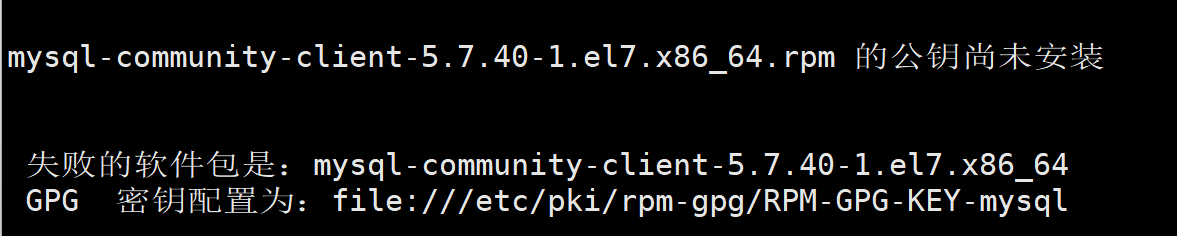
rpm --import https://repo.mysql.com/RPM-GPG-KEY-mysql-2022
yum -y install mysql-community-server
Start the mysql service
[root@node1 software]# service mysql startIf startup fails
[root@node1 software]# systemctl start mysqld.service- View the initial password (Note: the password is all characters after the colon!)
[root@node1 software]# grep 'temporary password' /var/log/mysqld.log- Log in to mysql
[root@node1 software]# mysql -uroot -p- Change the password
Change password policy
mysql> set global validate_password_policy=0;
mysql> set global validate_password_length=1;
Change password
mysql> SET PASSWORD = PASSWORD('123456');
Refresh rules to allow external access
update mysql.user set host='%' where user='root';
flush privileges;
2.3 Installing Hive
-
Hive download address: http://archive.apache.org/dist/hive/
-
Upload the hive installation package and mysql driver package to /opt/software
-
Extract apache-hive-3.1.2-bin.tar.gz to /opt
[root@node1 software]# tar -zxvf apache-hive-3.1.2-bin.tar.gz -C /opt/- Rename apache-hive-3.1.2-bin to hive-3.1.2
[root@node1 opt]# mv apache-hive-3.1.2-bin/ hive-3.1.2- Add hive environment variables
[root@node1 opt]# vim /etc/profile.d/bigdata_env.sh
#Hive_HOME
export HIVE_HOME=/opt/hive-3.1.2
export PATH=$PATH:$HIVE_HOME/bin- Make the configuration file effective
[root@node1 opt]# source /etc/profile.d/bigdata_env.sh- Check if the environment variables are effective
[root@node1 opt]# echo $HIVE_HOME
/opt/hive-3.1.2
Displaying /opt/hive-3.1.2 indicates successful installation. Next, complete some configurations to start.
- Resolve log Jar package conflicts
[root@node1 opt]# mv $HIVE_HOME/lib/log4j-slf4j-impl-2.10.0.jar $HIVE_HOME/lib/log4j-slf4j-impl-2.10.0.bak- Create a new hive-site.xml file in the $HIVE_HOME/conf directory
[root@node1 opt]# vim $HIVE_HOME/conf/hive-site.xmlAdd the following content
<?xml version="1.0"?>
<?xml-stylesheet type="text/xsl" href="configuration.xsl"?>
<configuration>
    <!-- jdbc connection URL -->
    <property>
        <name>javax.jdo.option.ConnectionURL</name>
        <value>jdbc:mysql://node1:3306/metastore?useSSL=false</value>
</property>

    <!-- jdbc connection Driver-->
    <property>
        <name>javax.jdo.option.ConnectionDriverName</name>
        <value>com.mysql.jdbc.Driver</value>
</property>


	<!-- jdbc connection username-->
    <property>
        <name>javax.jdo.option.ConnectionUserName</name>
        <value>root</value>
    </property>

    <!-- jdbc connection password -->
    <property>
        <name>javax.jdo.option.ConnectionPassword</name>
        <value>123456</value>
</property>

    <!-- Hive default working directory on HDFS -->
    <property>
        <name>hive.metastore.warehouse.dir</name>
        <value>/user/hive/warehouse</value>
    </property>

   <!-- Hive metadata storage verification -->
    <property>
        <name>hive.metastore.schema.verification</name>
        <value>false</value>
    </property>

    <!-- Metadata storage authorization  -->
    <property>
        <name>hive.metastore.event.db.notification.api.auth</name>
        <value>false</value>
    </property>
     <!-- Print table headers  -->
    <property>
    <name>hive.cli.print.header</name>
    <value>true</value>
    </property>
       <!-- Print database name  -->
   <property>
    <name>hive.cli.print.current.db</name>
    <value>true</value>
  </property>
       <!-- Specify the host for hiveserver2 connection -->
    <property>
        <name>hive.server2.thrift.bind.host</name>
        <value>node1</value>
    </property>
    <!-- Specify the port number for hiveserver2 connection -->
    <property>
        <name>hive.server2.thrift.port</name>
          <value>10000</value>
    </property>
</configuration>
9). Copy the MySQL JDBC driver to Hive's lib directory
[root@node1 software]# cp /opt/software/mysql-connector-java-5.1.37.jar $HIVE_HOME/lib2.4 Starting Hive
2.4.1 Initialize the metadata database
- Log in to mysql
[root@node1 software]# mysql -uroot -p123456- Create the Hive metadata database
mysql> create database metastore;
mysql> quit;- Initialize the metadata database
[root@node1 software]# schematool -initSchema -dbType mysql -verbose2.4.2 Starting Hive
[root@node1 software]# hive2.4.3 Simple hive operations
hive> show databases;
hive> use default;
hive> show tables;
hive> create table student (id int,name string);
hive> insert into student values(1,"lzh");
hive> select * from student;
2.4.4 Some hive interactive commands
- hive -e executes SQL statements without entering the hive interactive window
[root@node1 ~]# hive -e "select * from student;- hive -f executes SQL from a script
[root@node1 ~]# vim test.sql
select * from studen;
[root@node1 ~]# hive -f test.sql2.5 JDBC Access to Hive
- Add the following configuration to the $HADOOP_HOME/etc/hadoop/core-site.xml file. If it's a fully distributed setup, you need to distribute the core-site.xml file.
<!-- Configure the host nodes that root is allowed to access through the proxy -->
<property>
    <name>hadoop.proxyuser.root.hosts</name>
    <value>*</value>
</property>
<!-- Configure the groups that root is allowed to proxy for users -->
<property>
    <name>hadoop.proxyuser.root.groups</name>
    <value>*</value>
</property>-
Restart the hadoop cluster
-
Start the hiveserver2 service
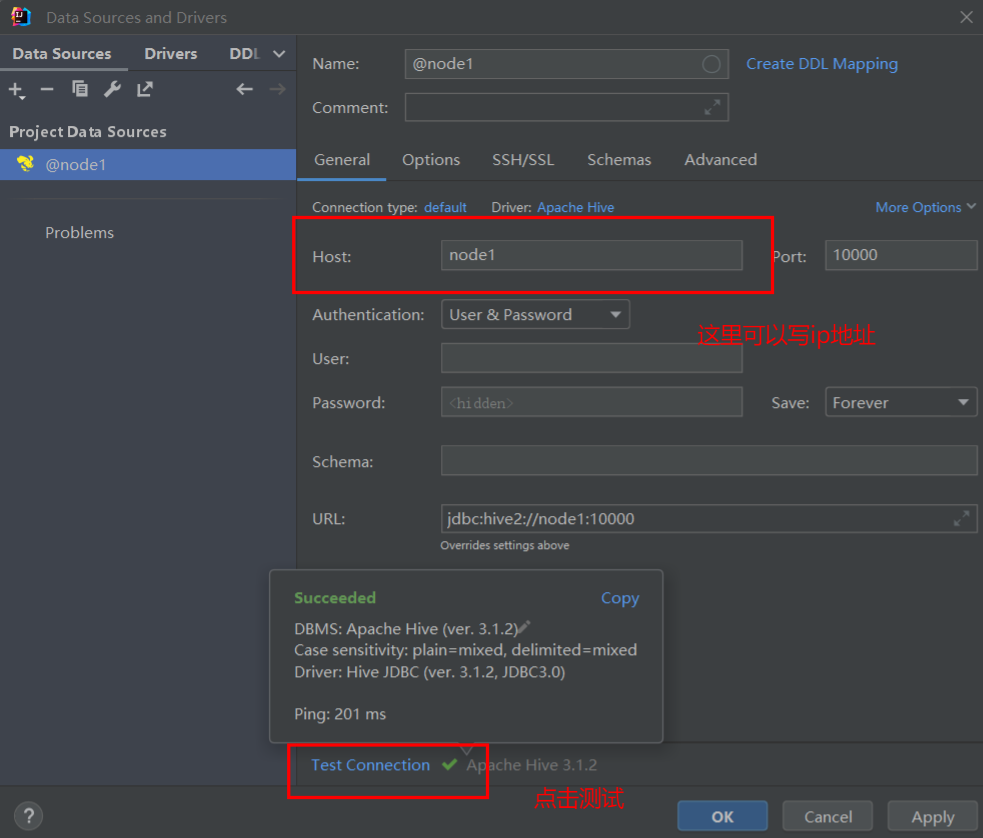
[root@node1 ~]# hive --service hiveserver2- Perform a connection test in IDEA

Chapter 3 Hive Data Types, File Formats, and Data Models
3.1 Hive Data Types
Hive data types are divided into two categories: primitive data types and collection data types.
- Primitive types.
Also known as raw types, they are the same as data types in most relational databases.
Hive's primitive data types and their descriptions are shown in the following figure.
| Hive Data Type | Java Data Type | Length | Example |
|---|---|---|---|
| Tinyint | byte | 1-byte signed integer | -128~127 |
| smallint | short | 2-byte signed integer | 1S |
| int | int | 4-byte signed integer | 1 |
| bigint | long | 8-byte signed integer | 1L |
| Boolean | boolean | Boolean type, true or false | TRUE FALSE |
| float | float | Single-precision floating point number | 3.14159 |
| double | double | Double-precision floating point number | 3.14159 |
| string | string | Character series. Can specify character set. Can use single or double quotes. | 'now is the time' "for all good men" |
| timestamp | Time type | ||
| binary | Byte array |
Like other SQL languages, these are reserved words. Note that all these data types are implementations of interfaces in Java, so the specific behavior details of these types are completely consistent with the corresponding types in Java. For example, the string type implements Java's String, float implements Java's float, and so on.
- Collection data types.
In addition to primitive data types, Hive also provides 3 collection data types: Array, Map, and Struct. A collection type means that the field can contain multiple values, sometimes also called complex data types. Hive collection data types and their descriptions are shown in the following figure. For specific usage, see later chapters.

3.2 Hive File Formats
Hive supports multiple file formats. The commonly used ones are: TextFile, SequenceFile, RCFile, ORCFile, and Parquet.
-
TextFile.
The default format. If not specified when creating a table, this format is used by default. When importing data, the data file is directly copied to HDFS without processing. The source file can be viewed directly using
hadoop fs -cat. It uses row-based storage, data is not compressed, disk overhead is high, and data parsing overhead is high. It can be combined with compression algorithms like Gzip, Bzip2 (the system automatically checks and decompresses during query execution), but when using compression, Hive will not merge or split the data. It is used frequently in production. -
SequenceFile.
SequenceFile is a binary file provided by the Hadoop API. It has the characteristics of being easy to use, splittable, and compressible. SequenceFile serializes data into the file in the form of key-value pairs. It uses row-based storage and is even larger than the default TextFile source file format. It is basically not used in production.
-
RCFile.
RCFile is a storage method that combines row and column storage. First, it divides data into row blocks, ensuring that data from the same row is in one block, avoiding the need to read multiple blocks to read one row of data. Second, block data is stored in columns, which is beneficial for data compression and fast column access. Theoretically, it has high query efficiency, but Hive officially states that the effect is not obvious, only saving about 10% of storage space, so it's not very useful and is rarely used in production.
-
ORCFile.
This is an upgraded version of RCFile. It uses columnar storage, supports multiple compression methods, has a high compression ratio, and supports various indexes and complex data structures. It is widely used in production.
-
Parquet.
Parquet uses columnar storage, has efficient compression methods, is not bound to any data processing technology, and can be used in multiple data processing frameworks. However, it does not support insert, update, or delete operations; it only supports queries. It is suitable for scenarios with many fields, no updates, and queries that only fetch some columns. It is widely used in production.
From the above comparison, we can find:
- The most used formats in production are TextFile, ORCFile, and Parquet; the rest are basically not used.
- The compression ratio from high to low among these three is: ORCFile, Parquet, and TextFile.
- The query speed from high to low among these three is: Parquet, ORCFile, and TextFile.
Additionally, tables in SequenceFile, RCFile, ORCFile, and Parquet formats cannot directly import data from local files. Data must first be imported into a TextFile format table, and then inserted into SequenceFile, RCFile, ORCFile, and Parquet tables using the insert statement.
The above file formats involve row-based storage and columnar storage. As shown in the figure below, here's a simple comparison:

| id | name | age |
|---|---|---|
| 1001 | zangsan | 18 |
| 1002 | lisi | 19 |
| 1003 | wangwu | 30 |
Row: select * from student where id=1001; Queries one data block
Column: select * from student where id=1001; Queries 3 data blocks
- Row-based storage always stores the same row of data in the same block. When querying with select, it queries all fields and cannot query a single column separately.
- Columnar storage always stores the same column of data in the same block. In other words, different columns can be placed in different blocks. When performing select queries, you can query a single column separately.
Row-based storage:
Advantages: Full-field queries are relatively fast.
Disadvantages: When querying a few fields from a table, the underlying layer still reads all fields, which reduces query efficiency and causes unnecessary resource waste. Moreover, scenarios requiring full-field queries are rare in production.
Columnar storage:
Advantages: When querying one or several fields, you only need to look at the blocks storing those fields, greatly reducing the data query scope and improving query efficiency.
Disadvantages: When performing full-field queries, data needs to be reassembled, which is slower than querying a single row.
3.3 Hive Data Models
All data in Hive is stored in HDFS. According to the granularity of data division, Hive includes the following data models: Table, Partition, and Bucket. From table to partition to bucket, the granularity of data division becomes increasingly smaller.
-
Table.
Hive tables are the same as tables in relational databases and support various relational algebra operations. There are two types of tables in Hive: managed tables (Table) and external tables (External Table).
- Managed Table.
Tables created by default in Hive are managed tables. The data for these tables is stored in the HDFS directory defined by the configuration item hive.metastore.warehouse.dir (e.g.,
/user/hive/warehouse). Each Table has a corresponding subdirectory in this data warehouse directory. When a managed table is deleted, Hive also deletes this data directory. Managed tables are not suitable for sharing data with other tools.- External Table.
When creating an external table in Hive, you need to specify the directory for data reading. External tables only record the path where the data is located and do not make any changes to the data's location. In contrast, when a managed table is created, data is stored in the default path. When deleting a table, managed tables delete both the data and metadata, while external tables only delete the metadata; the data files are not deleted. External tables and managed tables are organized identically in terms of metadata. Loading data and creating the table happen simultaneously for external tables, and data is not moved to the data warehouse directory.
-
Partition.
Suppose there is a database
testin Hive, andtesthas a managed tablestudentstored in the/user/hive/warehouse/test.db/studentdirectory. Now, let's partition by department: Mathematics, Arts, Physics, etc. Then all students belonging to the same department will be stored in the same partition. A partition is represented in storage as a subdirectory under the table directory. For example, students from the Mathematics department are stored in the/user/hive/warehouse/test.db/student/department=mathsdirectory. In this example,departmentis called the partition field (note: it is not a table field), andmathsis called the partition identifier. Queries for Mathematics students will be performed in this subdirectory, which is more efficient than querying the entire table. Partition tables are divided into static partition tables and dynamic partition tables. Both require specifying partition fields when creating the table. The difference is that static partition tables require manually specifying the partition identifier (when importing or inserting data, you need to specify it likedepartment=maths), while dynamic partitions can automatically generate partition identifiers based on the inserted data. Examples will be provided later.Note: Both managed tables and external tables can use partitions.
-
Bucket.
Bucketing involves splitting a single file in the same directory into multiple files, each containing a portion of the data, making it easier to retrieve values and improving retrieval efficiency. Partitions create different storage paths, while bucketing creates different data files. Partitions provide a convenient way to isolate data and optimize queries, but not all datasets can be reasonably partitioned. Bucketing is another technique for decomposing datasets into more manageable parts.
Users can distribute table data into buckets based on the HASH function value of a certain column. For example, if a table is further divided into n buckets, n files will be generated in the table directory. For the student table above, you could first partition it. If each partition is further divided into two buckets, there will be two files in each partition directory, recording different students from the same department (since they are in one partition).
Hive determines bucket allocation by taking the modulo of the HASH value of a certain column. There are two reasons for using bucket allocation: First, a well-designed Hash function can evenly divide data. When querying, the query condition value can be computed with the same Hash function to obtain a Hash value, allowing quick location of a specific bucket without a full data scan. Second, bucketing makes the sampling process more efficient, thereby reducing Hive query time.
Note: Buckets can be applied to managed tables, external tables, and partitioned tables.
In summary, tables (managed and external) are the basic form, and partitioning and bucketing are methods to further split tables according to certain rules to improve query efficiency.
Chapter 4 Hive Functions
4.1 Built-in Operators
Hive supports a variety of built-in operators and built-in functions for developers to use conveniently. You can also define custom functions (covered in later chapters) to implement specific features.
Built-in operators include arithmetic operators, relational operators, logical operators, and complex operators (covered in later chapters). The description of Hive built-in operators is shown in the following figure.

4.2 Built-in Functions
4.2.1 Viewing system built-in functions
hive (default)> show functions; 4.2.2 Mathematical functions
- round - rounding
hive (default)> select round(3.1415926,2);2 means keep 2 decimal places, 1 means keep 1 decimal place, 0 means round to the nearest integer, -1 means round to the nearest ten, -2 means round to the nearest hundred.
- ceil - round up
hive (default)> select ceil(3.14),ceil(-3.14);- floor - round down
hive (default)> select floor(3.14),floor(-3.14);- pow - power function
hive (default)> select pow(2,3);- abs - absolute value
hive (default)> select abs(3.14),abs(-3.14);In addition to the examples above, there are also the following functions, which will not be exemplified one by one:
Random number function: rand
Natural exponential function: exp
Base-10 logarithm function: log10
Base-2 logarithm function: log2
Logarithm function: log
Binary function: bin
Hexadecimal function: hex
Reverse hexadecimal function: unhex
Base conversion function: conv
Positive modulo function: pmod
Sine function: sin
Arcsine function: asin
Cosine function: cos
Arccosine function: acos
Positive function: positive
Negative function: negative
4.2.3 Type conversion functions
- cast - forced conversion between primitive types
hive (default)> select cast(1 as float),cast(3.14 as int);4.2.4 Date functions
- year, month, day, hour, minute, second - extract the corresponding year, month, day, hour, minute, second from a date
hive (default)> select year("2022-10-24 12:12:14");- datediff - number of days between two dates
hive (default)> select datediff("2022-10-24 12:12:14","2021-10-24 ");Note: The time difference is calculated by subtracting the second date from the first date.
- date_add, date_sub - add or subtract days from a date
hive (default)> select date_add("2022-10-24",2),date_sub("2022-10-24",2);4.2.5 Conditional functions
- if - branching
hive (default)> select if(1>2,"right","wrong");Think about: select if(1>2,"right",if(1=1,666,777));
- case - branching
hive (default)> select case when 1>0 then 666 when 1=0 then 777 when 1<0 then 888 end;Note: There is an end at the end.
Case exercise:
| name | class | sex |
|---|---|---|
| Hongyu | Class 3 | Male |
| Lingang | Class 3 | Male |
| Tianen | Class 4 | Male |
| Lusha | Class 3 | Female |
| Shixiang | Class 4 | Female |
| Lirui | Class 4 | Female |
Requirement: How many males and females are in each class?
Results:
class	male	female
Class 3		2 	 	 1
Class 4      1    	 2
Create a file and import data:
vi stu_sex.txt
Hongyu Class 3 Male
Lingang Class 3 Male
Tianen Class 4 Male
Lusha Class 3 Female
Shixiang Class 4 Female
Lirui Class 4 Female
Create the hive table
create table stu_sex(
name string,
class string,
sex string)
row format delimited fields terminated by " ";
load data local inpath 'stu_sex.txt' overwrite into table stu_sex;
Query the data
select
 class,
 sum(case sex when "Male" then 1 else 0 end ) as male,
sum(case sex when "Female" then 1 else 0Related posts
By shared tagsCommon Big Data Commands
Some common commands for big data

The Self-Cultivation of a SQL Engineer
Since I personally prefer using window functions, I prioritized them in my solutions. Of course, these may not always be the optimal approaches—the answers are for reference only.
Hazards of Small Files and How to Handle Them
Some insights on handling small files
Comments(0)